Flow builder

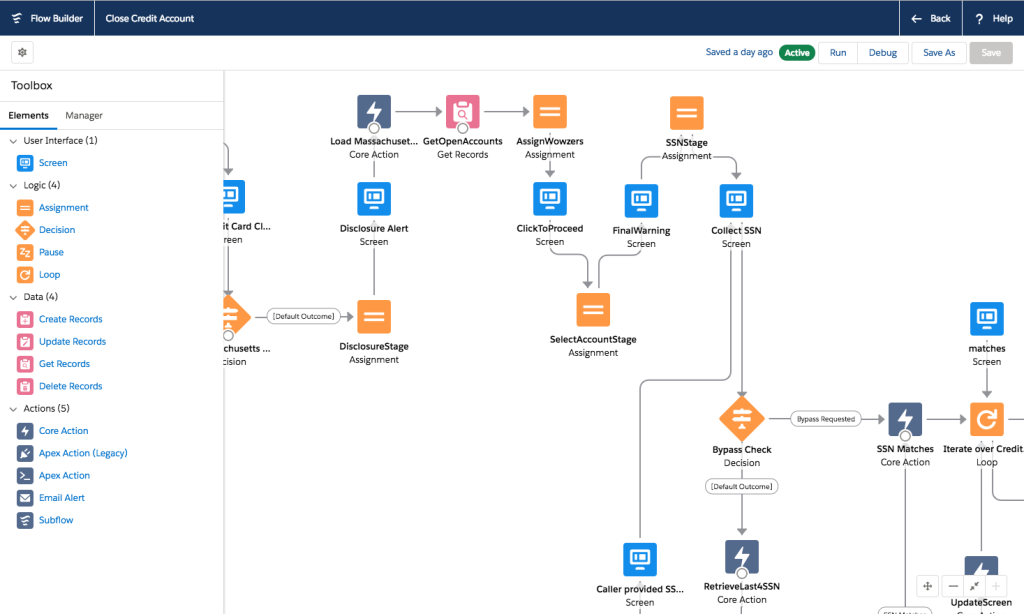
Use Flow Builder to automate processes in any Salesforce app, experience, or portal. It's easy, just click. Take the Flow Builder Tour to explore its user-friendly interface.

What is the Salesforce Flow Builder?

Flow Builder is your go-to solution for intuitive and powerful process automation within Salesforce. Forget complex coding—With Flow Builder, it’s all about simple clicks to create automated workflows for any Salesforce app, experience, or portal. Join us in uncovering the ease and efficiency that Flow Builder brings to your everyday tasks.
The Benefits

Currently, we have the following types of Flows in Salesforce:

Screen Flow

With Screen Flow you can create a custom UI (user interface) and guide users through a business process that can be launched from Lightning Pages, Experience Cloud (previously known as Community Cloud), quick actions and more.

Record-Triggered Flow

Record-Triggered Flow launches when a record is created, updated, or deleted. So far, we have used Apex triggers for these automations, some of which can now be done using Flows.

Scheduled-Triggered Flow

This flow launches at a specified time and frequency for each record in a batch. Traditionally we have met this kind of requirement using Apex batch jobs.

Platform Event Flow

Platform event flows launch when a platform event message is received. For example, you can pump the data from external system in platform events and then use flows to split and save the records in different objects.

Auto Launched Flow

Auto launched flow launches when invoked by Apex, process builder or even REST API.

Flow Building Blocks

Flows use building blocks to automate your business processes with elements, connectors, and resources

Screen Flow

With Screen Flow you can create a custom UI (user interface) and guide users through a business process that can be launched from Lightning Pages, Experience Cloud (previously known as Community Cloud), quick actions and more.

Record-Triggered Flow

Record-Triggered Flow launches when a record is created, updated, or deleted. So far, we have used Apex triggers for these automations, some of which can now be done using Flows.

Scheduled-Triggered Flow

This flow launches at a specified time and frequency for each record in a batch. Traditionally we have met this kind of requirement using Apex batch jobs.

Platform Event Flow

Platform event flows launch when a platform event message is received. For example, you can pump the data from external system in platform events and then use flows to split and save the records in different objects.

Auto Launched Flow

Auto launched flow launches when invoked by Apex, process builder or even REST API.

Flow Building Blocks

Flows use building blocks to automate your business processes with elements, connectors, and resources

Ready to transform? Let us guide you to a brilliant Salesforce solution.